For immediate assistance, please call us at (512) 328-3235
Micromain Software Release
Software Release Mobile App Update June 2023
Software Release
Mobile App Release June 2023
Introducing the Mobile Release: Experience Seamless Sync and Enhanced Performance
We are thrilled to announce our latest Mobile Release, packed with incredible sync improvements that will revolutionize your mobile experience. This release is a game-changer, with significant updates made under the hood to enhance performance and streamline your workflow. While some changes may not be immediately visible, rest assured that they will make a world of difference in your daily tasks.
Check out the exciting features and
enhancements in this release
-
Lightning-fast sync: Syncing your data is now faster than ever before. With our optimized technology, you can sync your mobile app in the blink of an eye – faster than a cheetah with its tail on fire!
-
Say goodbye to annoying pop-ups: We've heard your feedback, and we've eliminated the intrusive sync banner that used to interrupt your workflow. Now, you can focus on what you do best without any distractions.
-
Swift logins: Logging in after the first time is now a breeze. No more waiting around for ages to get started. Seamlessly access your account and jump right into action.
-
Enhanced performance with large data sets: We understand that handling large data sets can be challenging. That's why we've optimized our mobile app to handle big jobs effortlessly. You can now manage extensive tasks without breaking a sweat.
-
Minimized sync interruptions: We've worked tirelessly to reduce sync interruptions that could ruin your day. In the rare event that they do occur, we'll provide you with clear explanations and actionable steps to fix them promptly.
-
Intuitive document management: Our new and improved document management page empowers you with greater control. Download all your documents at once or search by task or resource to download only what you need. And if you no longer require certain files, easily delete them without cluttering your workspace.
-
Streamlined navigation: Inactive records are now conveniently located at the bottom of drop-down menus. This organizational improvement keeps them out of sight, ensuring a clean and focused interface.
-
Clear the clutter: Mobile technicians can now effortlessly remove documents, attachments, and signatures from tasks. Say goodbye to unnecessary clutter and confusion, and enjoy a clean workspace.
-
Bug fixes: We understand the frustration that bugs can cause, which is why we've diligently resolved any issues. Rest assured, we've fine-tuned our app to provide you with a seamless experience, free from pesky bugs.
Questions? We are here to help!
Get in touch with one of our representatives.
If you have a question or need assistance, please get in touch with us. Our friendly, knowledgeable staff will be happy to assist you!
Contact support at support@micromain.com or follow our quick guide to navigate the app


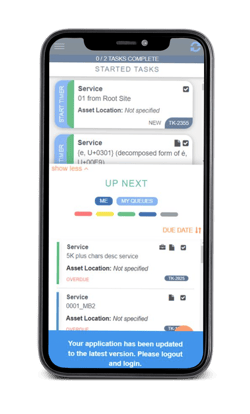
Note: Your app will update automatically after the release. You'll need to log out and log back in to refresh to the new app version. You'll receive a banner pictured here that will remind you to do so.